n8n vs Zapier vs Make in 2026: The Ultimate Comparison for Workflow Automation
Choosing the right automation platform can save you thousands. Here's an honest, hands-on comparison of n8n, Zapier, and Make — with real pricing calculations and clear recommendations.


Choosing the right automation platform can save you thousands of dollars and hundreds of hours per year — or cost you both if you pick the wrong one.
In 2026, three platforms dominate the workflow automation space: n8n, Zapier, and Make (formerly Integromat). Each takes a fundamentally different approach to automation, and the best choice depends entirely on your technical skills, budget, and workflow complexity.
I've been using all three platforms in production environments — running automated social media posting, content pipelines, CRM syncing, and data processing workflows. This isn't a surface-level overview. This is an honest, hands-on comparison based on real usage, real costs, and real results.
By the end of this article, you'll know exactly which platform fits your needs — and which ones will drain your budget without delivering proportional value.
Not sure what to automate first? Check our guide to the 10 tasks you should automate immediately.
TL;DR — Quick Comparison Table
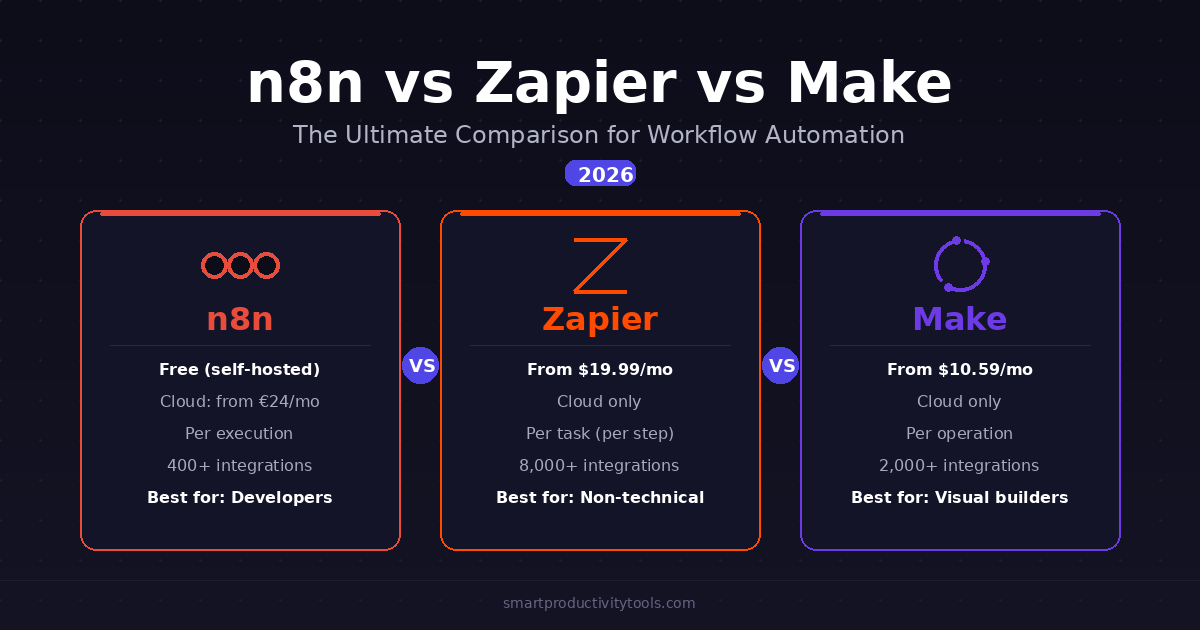
| Feature | n8n | Zapier | Make |
|---|---|---|---|
| Starting Price | Free (self-hosted) | $19.99/mo | $10.59/mo |
| Billing Unit | Per execution (whole workflow) | Per task (per step) | Per operation (per module) |
| Free Tier | Unlimited (self-hosted) | 100 tasks/mo | 1,000 ops/mo |
| Integrations | 400+ | 8,000+ | 2,000+ |
| Self-Hosting | ✅ Yes | ❌ No | ❌ No |
| AI Features | ⭐⭐⭐⭐⭐ | ⭐⭐⭐ | ⭐⭐⭐⭐ |
| Ease of Use | ⭐⭐⭐ | ⭐⭐⭐⭐⭐ | ⭐⭐⭐⭐ |
| Best For | Developers & tech teams | Non-technical users | Visual workflow builders |
Quick Verdict: Which One Should You Choose?
Before we dive deep, here's the short answer:
- Choose n8n if you're technically comfortable, want maximum control, and care about long-term cost efficiency. The self-hosted version is free with unlimited executions.
- Choose Zapier if you need the simplest possible setup, have a non-technical team, and your workflows are straightforward trigger-action sequences under 2,000 tasks per month.
- Choose Make if you need visual workflow building with advanced data transformation, want better value than Zapier, but aren't ready to self-host.
Now let's break down exactly why.
What Are These Tools, Exactly?
All three platforms solve the same fundamental problem: connecting different apps and automating repetitive tasks between them. But they approach it very differently.
n8n — The Open-Source Powerhouse
n8n is an open-source, self-hostable workflow automation platform. Think of it as the Linux of automation — maximum power and flexibility, but you need some technical knowledge to get the most out of it.
Key highlights:
- Run it for free on your own server with unlimited executions
- Cloud service starting at €24/month
- 400+ built-in integrations + unlimited custom API connections
- Write JavaScript/Python code inside any workflow step
- Full AI agent capabilities (OpenAI, Claude, Gemini, local models)
Zapier — The User-Friendly Market Leader
Zapier is the market leader and the most user-friendly option. It pioneered the "if this, then that" automation model and has the largest app ecosystem.
Key highlights:
- 8,000+ app integrations — the largest library by far
- AI Copilot builds workflows from natural language
- No coding required
- Plans start at $19.99/month (billed annually)
- Enterprise-grade support and reliability
Make — The Visual Middle Ground
Make (formerly Integromat) sits between Zapier's simplicity and n8n's power. It offers a visual drag-and-drop workflow builder that's more capable than Zapier's but easier than n8n's code-first approach.
Key highlights:
- Visual flowchart-style workflow builder
- Powerful data transformation (routers, iterators, aggregators)
- 2,000+ integrations
- Plans start at $10.59/month
- Growing AI agent capabilities
Pricing Comparison: Where Your Money Actually Goes
This is where the differences become dramatic. The pricing models are fundamentally different, and choosing the wrong platform can cost you 5–10x more than necessary.
How Each Platform Counts Usage
Understanding the billing unit is critical because it determines your actual cost:
| Platform | Billing Unit | What Counts | Example: 5-Step Workflow Running Once |
|---|---|---|---|
| n8n | Execution | 1 complete workflow run (steps don't matter) | 1 execution |
| Zapier | Task | Each action step (triggers are free) | 4 tasks |
| Make | Operation | Each module action (including triggers) | 5 operations |
Why this matters: A single workflow with 5 steps costs 1 unit on n8n, 4 units on Zapier, and 5 units on Make. Over thousands of runs, this difference is massive.
Pricing Tiers (2026)
n8n Pricing
| Plan | Price | Executions | Key Features |
|---|---|---|---|
| Self-Hosted Community | Free | Unlimited | Full features, you manage infrastructure |
| Starter (Cloud) | €24/mo | 2,500 | Managed hosting, no setup |
| Pro (Cloud) | €60/mo | 10,000 | Advanced features, collaboration |
| Business (Cloud) | €800/mo | 40,000 | SSO, Git integration, SLA |
All plans include unlimited users and unlimited workflows.
Zapier Pricing
| Plan | Price | Tasks | Key Features |
|---|---|---|---|
| Free | $0 | 100 | 2-step Zaps only |
| Professional | $29.99/mo | 750 | Multi-step Zaps, premium apps |
| Team | $103.50/mo | 2,000 | 25 users, shared folders, SSO |
| Enterprise | Custom | Custom | Dedicated manager, governance |
Overage rate: ~$0.01–0.03 per task beyond your limit.
Make Pricing
| Plan | Price | Operations | Key Features |
|---|---|---|---|
| Free | $0 | 1,000 | 2 active scenarios, 15-min intervals |
| Core | $10.59/mo | 10,000 | Unlimited scenarios, 1-min intervals |
| Pro | $18.82/mo | 10,000 | Priority execution, custom variables |
| Teams | $34.12/mo | 10,000 | Team roles, shared templates |
All paid plans start with 10,000 operations. Higher tiers unlock features, not more operations.
Real-World Cost Calculation
Let's calculate the actual monthly cost for a realistic use case:
Scenario: 10 automation workflows, each with 5 action steps, running 20 times per day.
| Platform | Calculation | Monthly Cost |
|---|---|---|
| Zapier | 10 × 20 × 30 × 5 tasks = 30,000 tasks | $150–250/mo |
| Make | 10 × 20 × 30 × 6 ops = 36,000 operations | $50–80/mo |
| n8n Cloud | 10 × 20 × 30 = 6,000 executions | ~€60/mo ($65) |
| n8n Self-Hosted | 6,000 executions (unlimited) + VPS | $5–20/mo |
Bottom line: For the same workload, you'd pay $200+ on Zapier, $65 on n8n Cloud, or as little as $5 on n8n self-hosted. The cost difference is staggering.
Ease of Use: From Beginner to Power User
Learning Curve Comparison
| Aspect | n8n | Zapier | Make |
|---|---|---|---|
| Time to first automation | 30–60 min | 5–10 min | 15–30 min |
| Coding required? | Optional but powerful | Never | Never |
| Setup complexity | Medium–High (self-hosted) / Low (cloud) | Very Low | Low |
| Complex workflow support | Excellent | Limited | Very Good |
| AI assistant | Built-in AI nodes | Copilot (natural language) | AI Toolkit |
Zapier: Easiest Learning Curve ⭐⭐⭐⭐⭐
Zapier wins the ease-of-use category by a wide margin. If you can fill out a web form, you can build a Zap. The interface guides you step by step:
- Pick a trigger app and event
- Pick an action app and event
- Map the data fields
- Turn it on
Zapier also offers Copilot, an AI assistant that builds Zaps from natural language. Tell it "When I get a new email in Gmail with an attachment, save it to Google Drive and notify me in Slack" — and it builds the workflow for you.
The downside: Zapier's simplicity becomes a limitation with complex workflows. Multi-path conditional logic, loops over data sets, and advanced error handling are either impossible or extremely awkward.
Make: Visual Power ⭐⭐⭐⭐
Make's drag-and-drop visual builder is genuinely impressive. You see your entire workflow as a flowchart, with data flowing visually from one module to the next.
Strengths:
- Visual branching logic with routers
- Built-in iterators for processing arrays
- Aggregators for combining data
- Visual debugging — see exactly where failures happen
Weaknesses:
- Steeper learning curve than Zapier (expect 2–3 hours)
- Concepts like routers and iterators take time to master
- Documentation sometimes lags behind features
n8n: Maximum Power, Maximum Learning Curve ⭐⭐⭐
n8n gives you the most control but demands the most from you. The workflow editor is visual (similar to Make), but the real power comes from custom code capabilities.
Strengths:
- Write JavaScript/Python in any workflow step
- Access raw API data and responses
- Test individual nodes without running entire workflows
- Build AI agents with decision-making loops
- Self-host for complete data control
Weaknesses:
- Self-hosted setup requires Docker knowledge
- Complex configurations need technical skills
- Smaller built-in integration library
- Community support only (unless Enterprise)
Integration Ecosystem
| Platform | Total Integrations | Premium Apps | Custom API Support | Webhooks |
|---|---|---|---|---|
| Zapier | 8,000+ | Yes (paid plans) | Limited | Yes |
| Make | 2,000+ | No tiers | HTTP module | Yes |
| n8n | 400+ | No tiers | Full HTTP Request node | Yes |
What These Numbers Really Mean
- Zapier's 8,000+ is its strongest advantage. If an app exists, Zapier probably has an integration. This matters most for niche apps.
- Make's 2,000+ covers all mainstream apps. The powerful HTTP module bridges gaps for technical users.
- n8n's 400+ is misleading. Every integration is deeply configurable, and the HTTP Request node connects to literally any API. The community constantly contributes new nodes.
Pro tip: If your specific niche apps aren't in Make or n8n, check if they have an API. If yes, you can connect them using HTTP/webhook nodes at no extra cost.
Performance and Reliability
| Metric | n8n (Self-Hosted) | n8n (Cloud) | Zapier | Make |
|---|---|---|---|---|
| Trigger polling | Custom (even 10sec) | 5 min+ | 1–15 min | 1–15 min |
| Webhook response | Instant | Instant | Instant | Instant |
| Uptime SLA | Depends on your server | 99.9% | 99.9%+ | 99.2% |
| Auto-retry on failure | Configurable | Yes | Yes | Yes |
| Error workflows | Full custom error flows | Yes | Email alerts | Error handler routes |
AI and Advanced Features
In 2026, AI integration is becoming a key differentiator. Here's how each platform handles it:
| AI Feature | n8n | Zapier | Make |
|---|---|---|---|
| LLM Support | OpenAI, Claude, Gemini, local models | OpenAI | OpenAI, Claude, Gemini |
| AI Agents | ✅ Full agent loops | ❌ Basic | ✅ Growing |
| Custom model support | ✅ Any API | ❌ Limited | ✅ BYOK (Bring Your Own Key) |
| Code execution in workflows | ✅ JS/Python | ❌ Limited code steps | ❌ No |
| Vector databases | ✅ Pinecone, Qdrant, etc. | ❌ | ❌ |
n8n: AI-Native Architecture ⭐⭐⭐⭐⭐
n8n treats AI as a first-class citizen. You can build AI agents that:
- Use tools and make decisions
- Process data through multiple LLMs
- Implement retry logic for hallucinations
- Chain models together in decision trees
- Connect to vector databases for RAG (Retrieval-Augmented Generation)
Zapier: Bolted-On AI ⭐⭐⭐
Zapier has added AI features including Copilot and AI action steps. You can add an OpenAI step to process text or classify data. However, the AI features feel supplementary — complex AI workflows with decision loops or multi-model pipelines are difficult to build.
Make: Growing AI Support ⭐⭐⭐⭐
Make offers native modules for OpenAI, Anthropic, and Google AI. The visual builder makes it easy to chain AI steps together. The recently introduced AI Agents feature allows autonomous workflows. More capable than Zapier, but less flexible than n8n.
Security and Compliance
| Security Feature | n8n (Self-Hosted) | n8n (Cloud) | Zapier | Make |
|---|---|---|---|---|
| Data location | Your server | EU (Germany) | US/EU | EU |
| SOC 2 compliance | N/A (your responsibility) | In progress | ✅ Type II | ❌ |
| GDPR compliant | ✅ (data stays with you) | ✅ | ✅ | ✅ |
| SSO (Single Sign-On) | Business plan | Business plan | Enterprise | Enterprise |
| Audit logs | Business plan | Business plan | Enterprise | Enterprise |
| Self-hosted option | ✅ | N/A | ❌ | ❌ |
| Source code access | ✅ Open source | ❌ | ❌ | ❌ |
For regulated industries (healthcare, finance, legal): n8n self-hosted is the strongest choice because your data never leaves your server. No third-party data processing means easier compliance with HIPAA, SOC 2, and GDPR.
Self-Hosting: The n8n Advantage
This is n8n's most significant differentiator, and it deserves its own section.
When you self-host n8n, you get:
- ✅ Unlimited executions — no per-execution fees
- ✅ Unlimited workflows — build as many as you need
- ✅ Unlimited users — no per-seat pricing
- ✅ Complete data privacy — your data never leaves your server
- ✅ Full customization — modify source code if needed
- ✅ Zero vendor lock-in — your instance keeps running regardless of pricing changes
The trade-off: You handle updates, backups, security, and uptime.
Self-Hosting Cost Breakdown
| Component | Monthly Cost |
|---|---|
| VPS (4GB RAM, 2 vCPUs) | $5–20 |
| Domain + SSL | Free (Let's Encrypt) |
| Backups | $0–5 |
| Maintenance time | ~30 min/month |
| Total | $5–25/month |
Compare this to Zapier's Professional plan at $29.99/month for just 750 tasks. A self-hosted n8n instance handles unlimited executions for less money.
Error Handling and Debugging
| Debugging Feature | n8n | Zapier | Make |
|---|---|---|---|
| See input/output per step | ✅ Detailed | ✅ Basic | ✅ Visual |
| Test individual steps | ✅ | ❌ | ✅ |
| Custom error workflows | ✅ Full error flows | ❌ Retries only | ✅ Error handler routes |
| Raw API inspection | ✅ | ❌ | ❌ |
| Execution log search | ✅ | ✅ | ✅ (Pro plan) |
| Auto-retry on failure | ✅ Configurable | ✅ Built-in | ✅ Built-in |
Real-World Use Cases: Which Platform Excels Where
🏆 Best for Social Media Automation: n8n
A complete social media pipeline (generate content with AI → create images → schedule posts across 4 platforms → track performance) runs as 1 execution on n8n. On Zapier, the same pipeline consumes 15–20 tasks per run. Over a month of daily posting, that's 450–600 tasks — nearly your entire Professional plan allotment.
I run exactly this workflow on a self-hosted n8n instance: a cron trigger fires daily, ChatGPT generates post text, Freepik creates an image, and content publishes to Facebook, Instagram, Pinterest, and Telegram. Cost: $0 beyond my VPS hosting.
🏆 Best for CRM & Sales Automation: Zapier
The sheer number of CRM integrations (HubSpot, Salesforce, Pipedrive, Close, and dozens more) makes Zapier the path of least resistance. Most CRM automations are simple trigger-action patterns that Zapier handles beautifully.
🏆 Best for Data Processing & ETL: Make
Make's visual builder with routers, iterators, and aggregators is purpose-built for data transformation. Split arrays, merge datasets, filter records, and format data — all visually. n8n can do this too, but often requires writing code.
🏆 Best for AI Content Pipelines: n8n
The ability to write custom code, chain multiple AI models, implement retry logic, and build decision trees makes n8n the clear winner for sophisticated AI workflows. The cost structure also favors n8n — AI pipelines tend to be long (10+ steps) and frequent.
🏆 Best for Simple App Connections: Zapier
For simple connections like "when new email → save attachment to Drive", Zapier's free or Professional plan is the fastest path. You'll have it running in 5 minutes with the 8,000+ app library.
When to Choose Each Platform
Choose n8n When:
- ✅ You have basic technical skills (comfortable with terminal, Docker, APIs)
- ✅ Cost efficiency is a priority
- ✅ You need complex AI workflows or custom integrations
- ✅ Data privacy matters (healthcare, finance, legal)
- ✅ You're building high-volume automations (1,000+ runs/day)
- ✅ You want to avoid vendor lock-in
Choose Zapier When:
- ✅ Your team is non-technical
- ✅ You need a specific niche app integration only Zapier supports
- ✅ Your workflows are simple (trigger → 1–3 actions)
- ✅ Volume is low (under 750 tasks/month)
- ✅ Speed of setup matters more than long-term cost
- ✅ You value enterprise support and guaranteed uptime
Choose Make When:
- ✅ You need visual workflow building with advanced logic (routers, loops)
- ✅ Budget matters but you don't want to self-host
- ✅ Your workflows involve heavy data transformation
- ✅ You're an agency building automations for multiple clients
- ✅ You want better value than Zapier without the complexity of n8n
Future-Proofing Your Choice
| Platform | Direction in 2026+ | Risk Factor |
|---|---|---|
| n8n | Heavy AI agent investment, growing integrations | Possible licensing changes (currently generous) |
| Zapier | Evolving into full AI platform (Tables, Interfaces, MCP) | Increasing complexity and cost |
| Make | AI Agents + Toolkit, rollover operations | Smaller market share than Zapier |
All three platforms will likely increase prices over time. This makes n8n self-hosted the most future-proof choice from a cost perspective — your expenses are tied to infrastructure costs, not platform pricing decisions.
Want to build a complete productivity system? Our Time & Task Management guide shows how to combine proven techniques with automation.
Community and Support
Getting help when something breaks matters more than most people realize. Here's how each platform handles support:
| Support Feature | n8n | Zapier | Make |
|---|---|---|---|
| Free plan support | Community forum | Community forum | |
| Paid plan support | Community (Enterprise: dedicated) | Email + live chat | Priority email |
| Community size | Active forum + Discord | Largest (blog, tutorials, guides) | 50,000+ forum members |
| Documentation quality | Good, developer-focused | Excellent, beginner-friendly | Comprehensive but sometimes outdated |
| Template library | Community-contributed workflows | Extensive pre-built Zaps | Scenario templates |
| Open-source contributions | ✅ Anyone can contribute nodes | ❌ Closed source | ❌ Closed source |
n8n Community
The open-source nature creates a vibrant ecosystem. The community forum and Discord server have thousands of members sharing workflows, troubleshooting issues, and building custom integrations. You can inspect the code, contribute fixes, and build your own custom nodes — a level of transparency impossible with closed-source platforms.
Zapier Support
Zapier has the most polished support experience. Their blog alone contains hundreds of step-by-step automation guides. Enterprise customers get a dedicated technical account manager. If you value hand-holding and documentation quality, Zapier leads the pack.
Make Community
Make's community forum is active and growing. The visual nature of Make scenarios makes them easy to share and replicate. However, cutting-edge features like AI Agents sometimes lack complete documentation, forcing you to rely on community experimentation.
Migration Tips
There's no automated migration tool between any of these platforms. You'll need to rebuild workflows manually. However:
- Start with highest-volume workflows — migrate these first for maximum cost savings
- The logic transfers directly — trigger-action patterns work across all platforms
- Document your current workflows before switching
- Run both platforms in parallel for 2 weeks before fully switching
- Test error handling — make sure your new workflows handle edge cases
The Bottom Line
The automation platform market in 2026 offers genuinely different options for genuinely different needs. There's no single "best" tool — only the best tool for your specific situation.
| Your Situation | Best Choice | Why |
|---|---|---|
| Technical user, budget-conscious | n8n (self-hosted) | Free, unlimited, maximum control |
| Non-technical, simple workflows | Zapier | Easiest setup, largest app library |
| Visual builder, moderate budget | Make | Best value, powerful visual editor |
| AI-heavy workflows | n8n | Most advanced AI capabilities |
| Enterprise/compliance needs | n8n self-hosted or Zapier Enterprise | Data sovereignty or enterprise support |
| Agency managing client work | Make | Visual builder + team features |
If I had to recommend just one platform for most readers of this blog, it would be n8n self-hosted. The combination of unlimited free executions, powerful AI integration, complete data privacy, and deep customization makes it the most versatile and cost-effective choice for anyone willing to invest a few hours in setup.
The worst decision you can make is choosing a platform based solely on initial pricing without calculating your actual monthly usage. Do the math first, map out your workflows, estimate your volume, and then choose. Your future self — and your budget — will thank you.
Want to set up your own n8n instance? Follow our complete self-hosting guide.
This article is regularly updated to reflect the latest pricing and feature changes. Last updated: March 2026.
Have you used any of these platforms? Which one works best for your workflow? Subscribe to our newsletter for more in-depth automation guides and tool comparisons.
Looking for free AI tools to pair with your automation platform? See our Best Free AI Tools for Solopreneurs guide.
Frequently Asked Questions
Is n8n really free?
Yes. The self-hosted Community Edition is genuinely free with unlimited executions, unlimited workflows, and unlimited users. You only pay for your server hosting (as low as $5/month on a VPS). The n8n Cloud service is a separate paid product starting at €24/month.
Can I switch from Zapier to n8n without losing my automations?
There's no automated migration tool. You'll need to rebuild your workflows manually. However, the logic transfers directly — the same trigger-action patterns work across all platforms. Start by migrating your highest-volume workflows first for maximum cost savings.
Which platform is best for beginners with no coding experience?
Zapier is the easiest starting point — you can build your first automation in under 10 minutes with zero technical knowledge. Make is the next step up with more power and a visual interface. n8n is best for users comfortable with technical concepts.
How many tasks/operations do I actually need per month?
Use this formula:
Number of workflows × Steps per workflow × Runs per day × 30 days
For example: 5 workflows × 4 steps × 30 runs/day × 30 days = 18,000 tasks on Zapier. On n8n, that same workload would be just 4,500 executions (steps don't count).
Is Make cheaper than Zapier?
Yes, significantly. Make's Core plan offers 10,000 operations for $10.59/month, while Zapier's Professional plan offers only 750 tasks for $29.99/month. Even accounting for different counting methods, Make typically delivers 3–5x more automation capacity per dollar.
Can I use n8n for a business without technical skills?
n8n Cloud is increasingly user-friendly and doesn't require server management. However, building complex workflows still requires understanding APIs and data structures. If your team is entirely non-technical, start with Zapier or Make and consider n8n once you have someone comfortable with technical tools.
Which platform has the best AI integration in 2026?
n8n leads in AI flexibility — it supports OpenAI, Anthropic (Claude), Google Gemini, and local models with the ability to build complex agent workflows. Make has solid AI modules with growing capabilities. Zapier's AI features are functional but feel supplementary rather than core to the platform.
What's the cheapest way to automate workflows in 2026?
Self-host n8n on a VPS for $5–20/month. You get unlimited executions, unlimited workflows, and unlimited users. For comparison, the cheapest Zapier paid plan ($19.99/month) gives you only 750 tasks — which a single complex workflow can burn through in days.
Do I need a developer to use n8n?
Not necessarily. n8n Cloud provides a managed experience similar to Make or Zapier. Basic automations (connecting Google Sheets to email, syncing CRM data) can be built without code. However, n8n's full power — custom API calls, JavaScript code nodes, AI agent loops — does require some technical knowledge. The sweet spot is having someone on your team who's comfortable reading API documentation.
Can I run n8n and Zapier together?
Absolutely. Many teams use Zapier for simple, non-technical automations (marketing triggers, form processing) while running n8n self-hosted for complex, high-volume workflows (data pipelines, AI content generation). This hybrid approach gives you the best of both worlds: Zapier's ease of use where it matters, and n8n's power and cost efficiency where volume or complexity demands it.