Time & Task Management in 2026: Proven Techniques, Best Apps, and How AI Changes Everything
Stop managing tasks randomly. This guide combines 8 battle-tested time management techniques with the 10 best apps in 2026, and shows you how to eliminate busywork entirely with AI and automation.


You've downloaded yet another to-do list app. You've watched the productivity YouTube videos. You've read about the Pomodoro Technique. And yet, at the end of most days, your task list is longer than when you started.
The problem isn't discipline — it's system design. Most people try random productivity hacks without understanding the underlying frameworks that actually work. Worse, they ignore the AI and automation tools that can eliminate entire categories of busywork.
This guide combines battle-tested time management techniques with the best modern apps and shows you how to supercharge everything with AI and automation. Whether you're a solopreneur, a team leader, or someone who just wants to stop feeling overwhelmed, you'll walk away with a complete system you can implement today.
Already automating your work? These techniques pair perfectly with the workflows in our 10 tasks you should automate guide.
Part 1: The 8 Most Effective Time Management Techniques
Not all productivity methods are created equal. Here are the ones that have stood the test of time — and which type of person each one works best for.
Quick Comparison: Which Technique Is Right for You?
| Technique | Best For | Core Idea | Time to Learn | Difficulty |
|---|---|---|---|---|
| Eisenhower Matrix | Overwhelmed prioritizers | Sort tasks by urgency × importance | 5 min | ⭐ Easy |
| Pomodoro Technique | Distracted deep workers | 25 min focus + 5 min break cycles | 5 min | ⭐ Easy |
| Time Blocking | Calendar-driven planners | Schedule every hour of your day | 15 min | ⭐⭐ Medium |
| Eat the Frog | Procrastinators | Do your hardest task first each day | 1 min | ⭐ Easy |
| 80/20 Rule (Pareto) | Strategic thinkers | 20% of tasks drive 80% of results | 10 min | ⭐⭐ Medium |
| Getting Things Done (GTD) | System-builders | Capture → Clarify → Organize → Engage → Review | 1–2 hours | ⭐⭐⭐ Hard |
| 1/3/5 Rule | Overwhelmed beginners | Plan 1 big + 3 medium + 5 small tasks daily | 2 min | ⭐ Easy |
| Ivy Lee Method | End-of-day planners | Write 6 tasks tonight for tomorrow | 5 min | ⭐ Easy |
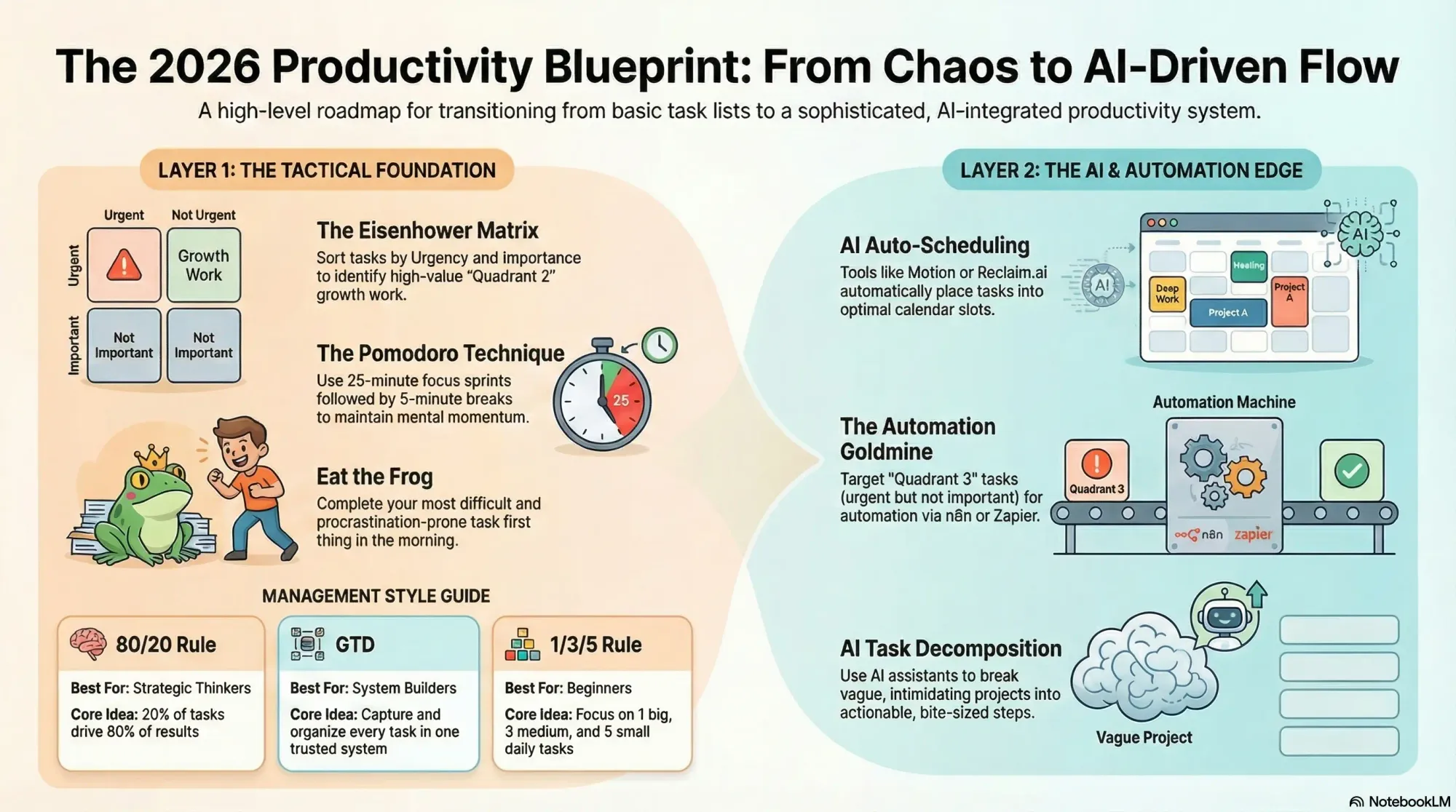
1. The Eisenhower Matrix
Named after President Dwight D. Eisenhower, who famously said: "What is important is seldom urgent, and what is urgent is seldom important."
The Eisenhower Matrix sorts every task into four quadrants:
| Urgent | Not Urgent | |
|---|---|---|
| Important | Q1: DO — Crisis, deadlines, emergencies | Q2: SCHEDULE — Planning, learning, relationships |
| Not Important | Q3: DELEGATE — Most emails, some meetings, interruptions | Q4: DELETE — Social media scrolling, time-wasters |
How to use it:
- Write down everything on your to-do list
- Place each task in the appropriate quadrant
- Work on Q1 tasks immediately
- Schedule Q2 tasks in your calendar (these are the tasks that drive long-term success)
- Delegate or automate Q3 tasks
- Eliminate Q4 tasks entirely
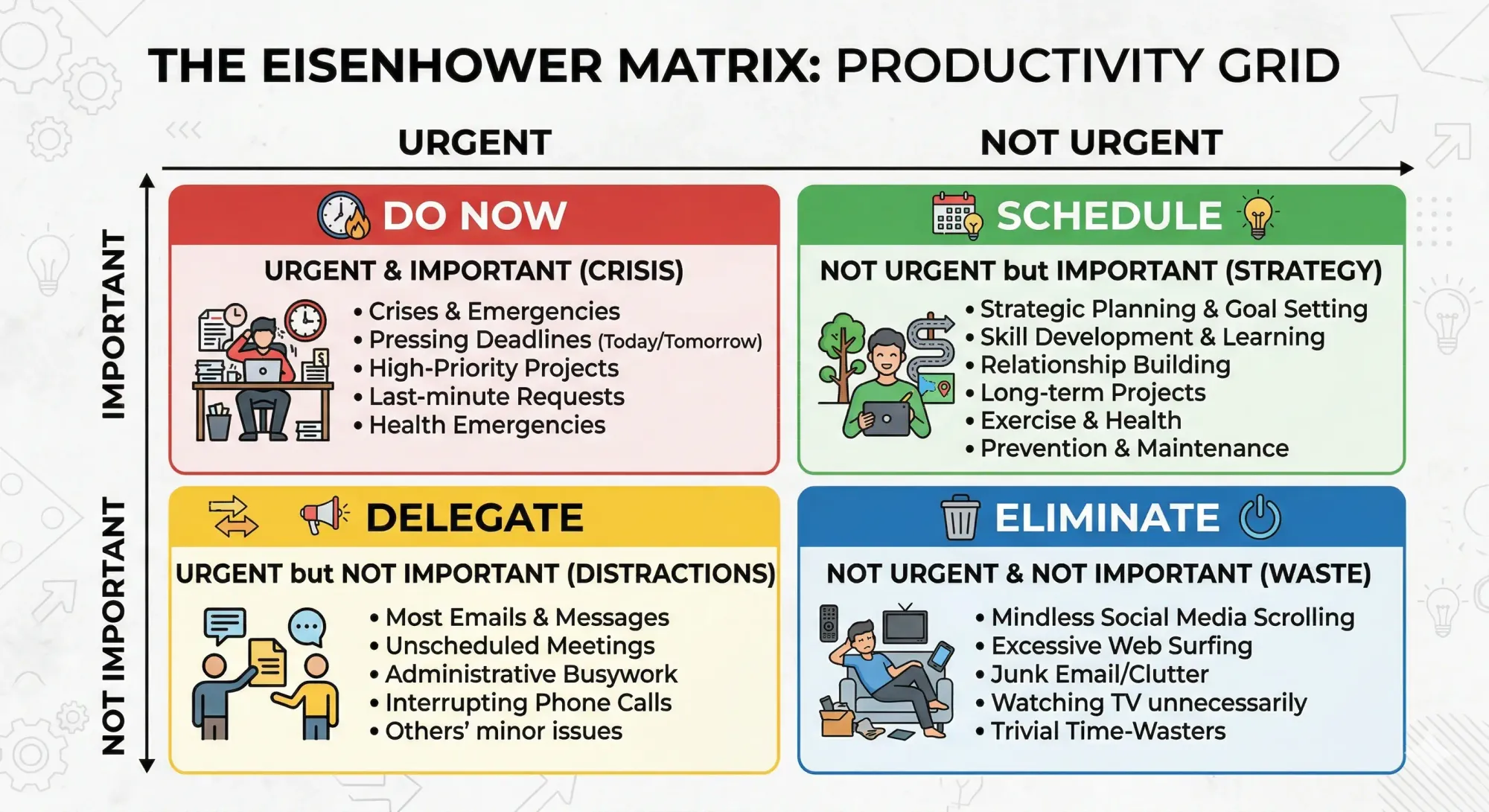
The insight most people miss: Q2 (Important but Not Urgent) is where the magic happens. These are the tasks — strategic planning, skill development, relationship building — that transform your career and business. If you're always stuck in Q1 (putting out fires), you never get to Q2.
AI tip: Use ChatGPT or Claude to help categorize your task list. Paste your to-do list and ask: "Sort these tasks into an Eisenhower Matrix. For Q3 tasks, suggest how I could automate or delegate each one."
2. The Pomodoro Technique
Developed by Francesco Cirillo in the late 1980s using a tomato-shaped kitchen timer (pomodoro = tomato in Italian).
The method:
- Pick one task to work on
- Set a timer for 25 minutes
- Work with full focus until the timer rings — no checking email, no messages
- Take a 5-minute break (stretch, walk, grab water)
- After 4 Pomodoros, take a 15–30 minute break
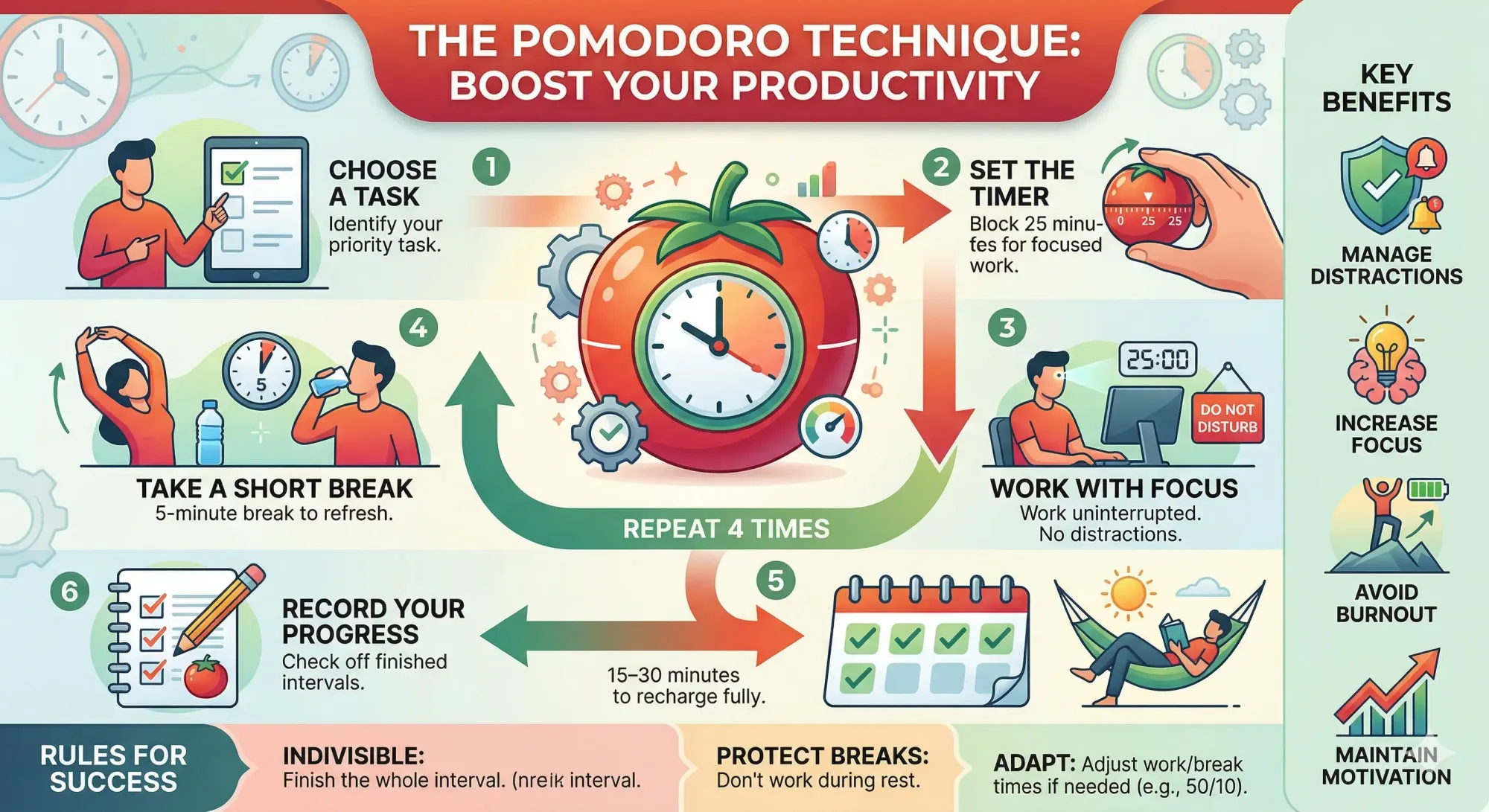
Why it works: The 25-minute constraint creates artificial urgency. Your brain knows the break is coming, so it's easier to resist distractions. The breaks prevent mental fatigue from accumulating over long sessions.
Variations for different work types:
| Work Type | Recommended Interval | Break |
|---|---|---|
| Writing, creative work | 25 min (classic) | 5 min |
| Deep coding, analysis | 50 min | 10 min |
| Email, admin tasks | 15 min | 3 min |
| Learning, studying | 25 min | 5 min |
Best Pomodoro apps: Pomofocus (free, web-based), Forest (gamified, plants trees while you focus), Focus Keeper (iOS/Android).
3. Time Blocking
Time blocking means scheduling every hour of your day in advance — not just meetings, but also deep work, email processing, breaks, and personal tasks.
How to set it up:
- Identify your peak energy hours (for most people: 9–11 AM)
- Block those hours for your most important Q1/Q2 work
- Batch similar tasks together (all emails in one 30-min block, all calls in another)
- Add buffer time between blocks (15 min) for transitions and unexpected tasks
- Include breaks, lunch, and shutdown time
Sample time-blocked day:
| Time | Block | Type |
|---|---|---|
| 8:00–8:30 | Morning planning + Eisenhower Matrix | Planning |
| 8:30–10:30 | Deep work (most important task) | Focus |
| 10:30–11:00 | Email processing | Admin |
| 11:00–12:00 | Client calls / meetings | Communication |
| 12:00–13:00 | Lunch + walk | Break |
| 13:00–14:30 | Project work (second priority) | Focus |
| 14:30–15:00 | Email + Slack catch-up | Admin |
| 15:00–16:30 | Creative work or learning | Growth |
| 16:30–17:00 | End-of-day review + plan tomorrow (Ivy Lee) | Planning |
AI scheduling: Motion ($19–34/mo) automatically time-blocks your day using AI, adjusting your schedule as priorities change. Reclaim.ai (free tier) offers a lighter version of the same idea.
4. Eat the Frog
Attributed to Mark Twain: "If it's your job to eat a frog, it's best to do it first thing in the morning."
The "frog" is the task you're most likely to procrastinate on — usually the most important and most uncomfortable task on your list. Do it first, before anything else.
How to implement:
- Every evening, identify tomorrow's "frog" (the one task you're dreading)
- Every morning, work on that task before checking email, messages, or social media
- Once the frog is eaten, everything else feels easier
Why it works: Decision fatigue is real. You have the most willpower and mental energy in the morning. By front-loading your hardest task, you ensure it actually gets done instead of being pushed to "tomorrow" indefinitely.
5. The 80/20 Rule (Pareto Principle)
Italian economist Vilfredo Pareto discovered that 80% of outcomes come from 20% of causes. Applied to productivity: 20% of your tasks produce 80% of your results.
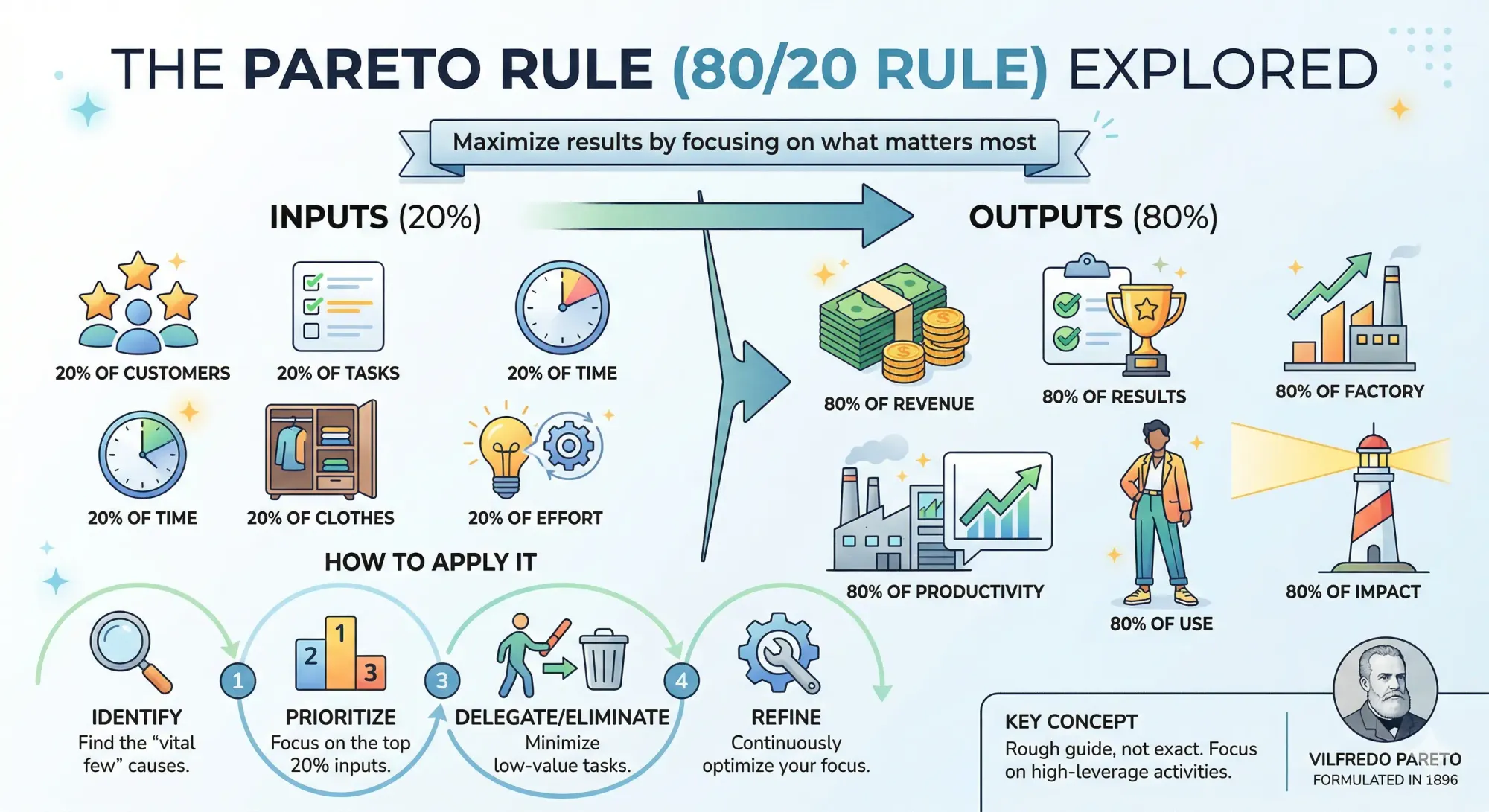
How to apply it:
- List all tasks you worked on last week
- Identify which ones actually moved the needle on your goals
- You'll likely find that 2–3 tasks out of 10 created most of the value
- Restructure your week to spend more time on those high-impact tasks
- Automate, delegate, or eliminate the rest
Automation connection: The 80/20 rule is the foundation for deciding which tasks to automate. The low-impact 80% are prime candidates for n8n, Zapier, or Make automation.
6. Getting Things Done (GTD)
David Allen's comprehensive system from his book Getting Things Done. It's the most thorough method — and the most complex.
The five steps:
- Capture — Write down every task, idea, and commitment in a trusted system (not your brain)
- Clarify — For each item, decide: Is it actionable? If yes, what's the next physical action?
- Organize — Put items into lists: Next Actions, Waiting For, Projects, Someday/Maybe
- Engage — Work from your Next Actions list, choosing tasks based on context, time available, and energy
- Review — Weekly review of all lists to keep the system current
GTD is best for: People managing complex responsibilities across multiple projects. It's overkill for someone with a simple task list, but transformative for managers, executives, and solopreneurs juggling many roles.
7. The 1/3/5 Rule
The simplest daily planning technique. Each day, commit to completing:
- 1 big task (takes 1–2 hours, moves the needle)
- 3 medium tasks (30–60 min each)
- 5 small tasks (under 15 min each)
Total: 9 tasks per day. This feels achievable without being overwhelming, and it forces you to acknowledge that you can't do everything.
8. The Ivy Lee Method
Developed in 1918 by productivity consultant Ivy Lee. Over 100 years later, it still works.
The process (takes 5 minutes):
- At the end of each workday, write down the 6 most important tasks for tomorrow
- Prioritize them in order of importance
- The next morning, start with task #1
- Don't move to task #2 until #1 is completely finished
- At the end of the day, move any unfinished tasks to tomorrow's new list of 6
Why it's powerful: It forces single-tasking, eliminates decision paralysis in the morning, and ensures you always know exactly what to work on next.
Part 2: The Best Task Management Apps in 2026
The right app makes any technique 10x easier to implement. Here's how the top options compare:
Task Management Apps Comparison
| App | Best For | AI Features | Free Tier | Paid Price | Platforms |
|---|---|---|---|---|---|
| Todoist | Simple personal tasks | Natural language input, AI assistant | ✅ 5 projects | $4–6/mo | All |
| Notion | All-in-one workspace | AI writing, search, agents | ✅ Limited | $10/mo | All |
| Asana | Team project management | AI status updates, workflows | ✅ 10 users | $10.99/mo | All |
| Trello | Visual Kanban boards | Butler automation | ✅ 10 boards | $5/mo | All |
| TickTick | Tasks + habits + focus | Pomodoro timer built-in | ✅ Generous | $3/mo | All |
| Motion | AI auto-scheduling | Full AI calendar + task scheduling | ❌ 7-day trial | $19–34/mo | All |
| ClickUp | Highly customizable teams | AI writing, task creation | ✅ Limited | $7/mo | All |
| Reclaim.ai | AI calendar optimization | AI focus time, habit scheduling | ✅ Basic | $8/mo | Web + Calendar |
| Microsoft To Do | M365 users | My Day suggestions | ✅ Free | Free | All |
| Google Tasks | Google Workspace users | Basic integration | ✅ Free | Free | All |
Which App Matches Which Technique?
| Technique | Best App | Why |
|---|---|---|
| Eisenhower Matrix | Notion or Todoist | Custom priority labels/views |
| Pomodoro | TickTick or Pomofocus | Built-in Pomodoro timer |
| Time Blocking | Motion or Reclaim.ai | AI auto-schedules into calendar blocks |
| Eat the Frog | Todoist | Flag one task as P1 each evening |
| GTD | Notion or Todoist | Custom views for Next Actions, Waiting For, etc. |
| 1/3/5 Rule | Todoist or TickTick | Simple daily lists with priority levels |
| Ivy Lee | Any simple app | Just need a list of 6 items |
| Kanban/Visual | Trello | Best visual board experience |
Part 3: How AI Is Transforming Time Management
In 2026, AI doesn't just help you manage tasks — it can prioritize, schedule, and even complete them for you.
AI-Powered Productivity Features Worth Using
| AI Feature | What It Does | Available In |
|---|---|---|
| AI auto-scheduling | Automatically places tasks in optimal calendar slots | Motion, Reclaim.ai |
| Natural language task creation | Type "Submit report Friday 3pm" → creates task with date | Todoist, ClickUp |
| Smart prioritization | AI suggests which task to work on next based on deadlines and importance | Motion, Asana |
| Meeting summarization | AI transcribes meetings and extracts action items | Fireflies.ai, Otter.ai |
| Email triage | AI categorizes and drafts responses to emails | Superhuman, Gmail AI |
| Focus time protection | AI blocks calendar time for deep work | Reclaim.ai, Clockwise |
| Task decomposition | AI breaks large tasks into smaller actionable steps | Todoist Assist, ChatGPT |
Using AI Assistants for Task Management
You don't need a specialized app to get AI task management. Here's how to use free AI tools for productivity:
Morning planning with AI:
Paste your task list into ChatGPT or Claude and ask:
"Here are my tasks for today. Sort them into an Eisenhower Matrix, suggest which 3 I should focus on first, and identify any that could be automated or delegated."
Weekly review with AI:
At the end of each week, paste your completed and incomplete tasks:
"Here's what I completed this week and what I didn't finish. What patterns do you see? Which tasks should I automate? What should I delegate or eliminate next week?"
Project breakdown with AI:
Got a vague, intimidating project? Ask AI to decompose it:
"Break down 'Launch new product line' into specific, actionable tasks with estimated time for each. Organize them into a timeline for the next 4 weeks."
Part 4: Connecting Task Management to Automation
Here's where most productivity guides stop — they tell you how to manage your tasks, but not how to eliminate them entirely. The real productivity breakthrough in 2026 is automating the tasks that shouldn't be on your list at all.
The Automation Priority Framework
Combine the Eisenhower Matrix with automation:
| Eisenhower Quadrant | Action | Automation Opportunity |
|---|---|---|
| Q1: Urgent + Important | Do it now | Limited — these need your judgment |
| Q2: Not Urgent + Important | Schedule it | AI can help plan and prepare |
| Q3: Urgent + Not Important | Delegate or automate | Prime automation candidates |
| Q4: Not Urgent + Not Important | Delete | Automate the deletion (email filters, notification muting) |
Q3 tasks are your automation goldmine. These are tasks that feel urgent (inbox notifications, social media posting, data entry, report generation) but don't actually require your unique skills or judgment.
Real Automation Examples
| Repetitive Task | Automation Solution | Tool |
|---|---|---|
| Email sorting | Auto-label and archive by sender/keyword | Gmail filters or n8n |
| Social media posting | AI generates + auto-publishes daily | n8n + ChatGPT + Freepik |
| Meeting follow-ups | Auto-transcribe → extract actions → create tasks | Fireflies.ai + Zapier + Todoist |
| Invoice processing | AI reads invoice → logs to spreadsheet | Make + OpenAI Vision |
| Weekly reports | Auto-pull data → AI summarizes → emails stakeholders | n8n + Google Sheets + Gmail |
| Lead capture | Form → CRM → welcome email → Slack notification | Zapier + HubSpot |
| File organization | Auto-sort downloads by file type | n8n + Google Drive |
Want step-by-step instructions? Our automation guide covers each of these with setup tutorials for n8n, Zapier, and Make.
Part 5: Building Your Complete Productivity System
The best productivity system combines techniques, apps, and automation into a cohesive workflow. Here's how to put it all together.
The 3-Layer Productivity Stack
Layer 1: Technique (how you think about work)
- Use the Eisenhower Matrix for weekly planning
- Use Eat the Frog + Pomodoro for daily execution
- Use the Ivy Lee Method for end-of-day planning
Layer 2: App (where you manage work)
- Todoist or Notion for task management
- Google Calendar or Motion for time blocking
- Fireflies.ai for meeting notes
Layer 3: Automation (what you eliminate entirely)
- n8n or Zapier for workflow automation
- AI assistants for content creation and analysis
- Email filters for inbox management
Want a deep dive in Notion? See our Complete Guide to Notion in 2026 covering AI Agents, pricing, and setup.
Budget-Friendly Stack Options
| Budget | Technique Layer | App Layer | Automation Layer | Monthly Cost |
|---|---|---|---|---|
| $0 | All techniques are free | Todoist free + Google Calendar + TickTick free | Gmail filters + free AI tools | $0 |
| $10 | Same | Todoist Pro ($4) + Reclaim.ai free | n8n self-hosted ($5 VPS) | ~$9 |
| $30 | Same | Notion ($10) + Motion trial | n8n ($5) + ChatGPT API (~$15) | ~$30 |
| $50+ | Same | Motion ($29) + Notion ($10) | n8n ($5) + AI tools | ~$44 |
The Bottom Line
Time management in 2026 isn't just about personal discipline — it's about building a system that combines proven techniques with modern tools.
Start here:
- Today: Pick one technique (Eisenhower Matrix is the best starting point) and one app (Todoist free is the easiest)
- This week: Time-block your calendar and use Pomodoro for focused work sessions
- This month: Identify your Q3 tasks and start automating them with n8n or Zapier
- Ongoing: Weekly review every Friday — refine your system, automate more, eliminate more
The techniques are free. The apps have generous free tiers. The automation tools are either free (n8n self-hosted) or affordable. The only investment required is an hour of setup time — and that hour will pay for itself within the first week.
Stop managing your time. Start designing your system.
This guide is updated regularly with new apps and AI features. Last updated: March 2026.
What productivity system works best for you? Subscribe for more guides on building efficient workflows with AI and automation.
Want to apply these principles to your meetings? See how the world's most successful leaders run their meetings with rules from Bezos, Musk, and Jobs.
Frequently Asked Questions
What's the single best time management technique for beginners?
The Eisenhower Matrix. It takes 5 minutes to learn, doesn't require any app, and immediately helps you identify what's actually important versus what just feels urgent. Combine it with the 1/3/5 Rule for daily planning and you have a complete system in under 10 minutes.
Can AI really manage my tasks better than I can?
For scheduling and prioritization, yes. Tools like Motion and Reclaim.ai consistently outperform manual calendar management because they can process more variables simultaneously (deadlines, energy levels, meeting conflicts, task dependencies). However, AI can't decide what's important to you — that's still a human judgment call.
Is it worth paying for a task management app?
If you're currently using no system, start with free tools (Todoist, Google Calendar, TickTick). Upgrade only when you hit a specific limitation. For most solopreneurs, the free tiers of Todoist + Google Calendar + Reclaim.ai cover 90% of needs.
How do I stop procrastinating on important tasks?
Combine Eat the Frog (do the hardest task first) with Pomodoro (commit to just 25 minutes). The key psychological trick: you're not committing to finishing the task, just to working on it for 25 minutes. Most of the time, once you start, momentum carries you through.
How do Pomodoro and time blocking work together?
They're complementary. Time blocking defines what you'll work on and when. Pomodoro defines how you'll work within those blocks. For example, your 9:00–11:00 "Deep Work" time block might contain 4 Pomodoro sessions of 25 minutes each, with 5-minute breaks between them.
Which tasks should I automate first?
Start with Eisenhower Q3 tasks (urgent but not important) — email sorting, social media posting, data entry, and invoice processing. These are high-frequency tasks that follow predictable patterns, making them ideal for workflow automation.
What's the difference between task management and project management apps?
Task management apps (Todoist, TickTick, Microsoft To Do) focus on personal to-do lists and individual productivity. Project management apps (Asana, Monday.com, ClickUp) add team collaboration, timelines, dependencies, and reporting. For solopreneurs, task management apps are usually sufficient. For teams of 3+, consider project management apps.
How do I choose between Notion and Todoist?
Todoist if you want a dedicated, fast, clean task manager that works immediately. Notion if you want an all-in-one workspace that combines tasks, notes, databases, and documentation. Todoist is better for pure task management; Notion is better if you also need a knowledge base and wiki.